What the AI Can Do
Early Alpha
The XGENIA AI Agents is in early alpha. Tools are added and retired regularly.
The assistant works through tools — concrete actions it can take on your project. You never call a tool yourself; you describe the outcome and the AI picks the tools. Knowing roughly what exists helps you ask for the right thing.
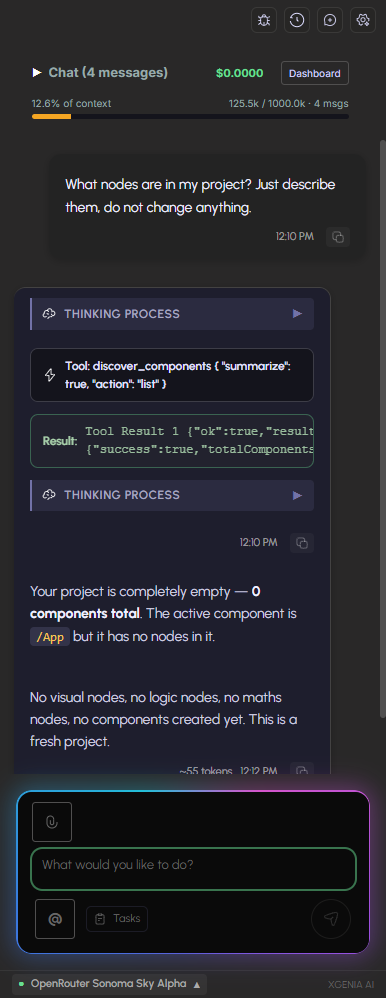
Every tool call shows up in the chat as a step bubble. Click one to see the exact call and its result.
Building
| Capability | What you can ask for |
|---|---|
| Components | Create a component, create an instance of one, extract a selection into its own component, copy nodes between components, switch which component is active |
| UI from a description | Generate a layout from plain language, from HTML, or from XML; build a hierarchical UI in one pass |
| Nodes | Create logic nodes, visual nodes, and whole chains in a single batch; duplicate, move, reparent, and reorder |
| Wiring | Connect signals and data, wire a button to a variable, auto-wire matching ports, apply a wiring recipe, scaffold an event pair |
| JavaScript | Create and edit JavaScript function nodes |
| State | Build a state manager, create visual states, set up routing |
| Design | Apply a design delta, align and auto-organise nodes, set parameters in bulk, load fonts, import from Figma |
| Animation | Animate a node |
Understanding your project
| Capability | What you can ask for |
|---|---|
| Discovery | List all components, find components or assets by keyword, list available nodes, find nodes by label |
| Inspection | Read a node's details, ports, schema, and runtime state; get a component's XML or generated code |
| Tracing | Trace where a signal or value flows, trace an entire pipeline in one call, trace where a function is used |
| Search | Grep the project code, semantic search across components, search node source |
| Health | Analyse component health, check connection health, find orphaned state, detect the main UI component |
Debugging and repair
| Capability | What you can ask for |
|---|---|
| Logs | Read console logs, runtime logs, editor warnings, and execution status |
| Simulation | Fire a signal by hand, simulate an interaction, observe a timeline of events |
| Validation | Validate graph architecture, verify logic correctness, diagnose port health, run tests |
| Repair | Auto-fix a broken graph, clean duplicate nodes and orphaned connections, fix label collisions, fix architectural violations |
| Undo | Undo and redo editor actions |
Seeing the running app
| Capability | What you can ask for |
|---|---|
| Browser control | Open a preview, click, type, wait, evaluate an expression, close |
| Screenshots | Capture the current screen and analyse it |
| Console | Read browser console output while the app runs |
| Rendered output | Fetch the rendered HTML for a component or the whole page |
| Highlighting | Highlight an element so you can see what the AI is talking about |
See Images & Vision.
Media
| Capability | What you can ask for |
|---|---|
| Images | Generate, edit, upscale, split into layers, inspect, and save into the project |
| Video and audio | Generate clips and audio |
| Assets | Manage project assets, read spritesheet slices, place art, set the project base style |
Media generation needs a Fal.ai key — see Image, Video & Audio.
Planning and memory
| Capability | What you can ask for |
|---|---|
| Task plans | Write, update, and check off a task list — visible in the Tasks panel |
| Plans | Write an architecture plan up front and read it back later |
| Project brain | Save what it learned about your project so the next session starts informed |
| Skills | Save a successful build pattern for reuse |
| Checkpoints | Save and resume a build checkpoint |
| Asking you | Stop and ask a question when a request is genuinely ambiguous |
See Skills & Knowledge.
Shipping
| Capability | What you can ask for |
|---|---|
| Deploy | Deploy to Vercel, check preview status |
| Backend | Set up a Supabase project, check its status, connect services, inspect a cloud function |
| Version control | Git status, commit, push, history, checkpoint, and revert |
Extensions
| Capability | What you can ask for |
|---|---|
| MCP | Discover, add, authenticate, test, and call tools on external MCP servers — see MCP Servers |
| Web search | Search the internet for current information |
| Machine learning | Hugging Face predictions and AutoTrain workflows |
| Slot / RGS | Create and test slot games, extract maths, run RTP checks and certification reports |
Asking well
The tools are broad; the request is what narrows them.
- Name the target. "In the Login component…" or
@-mention the node. - State the outcome, not the steps. "The button should be disabled until both fields have text" beats "add a condition node".
- Say when it must be verified. "Take a screenshot and confirm" turns a claim into a check.
- One goal per message. Long compound requests are where plans drift.