Skills & Knowledge
The XGENIA AI Agents is in early alpha. These panels change often.
The assistant keeps two kinds of memory about your project, and both have a settings tab so you can see what it actually knows.
| Skills | Knowledge | |
|---|---|---|
| What it holds | How to do something — a build pattern that worked | What is true about this project |
| Stored in | .xgenia/skills/ | .xgenia/brain.json |
| Comes from | Successful builds you or the AI chose to save | The AI reading and mapping your project |
| Used | Injected into every conversation | Injected into every conversation |
Both live with your project and are git-friendly, so they travel with the repo and your team gets them too.
Skills
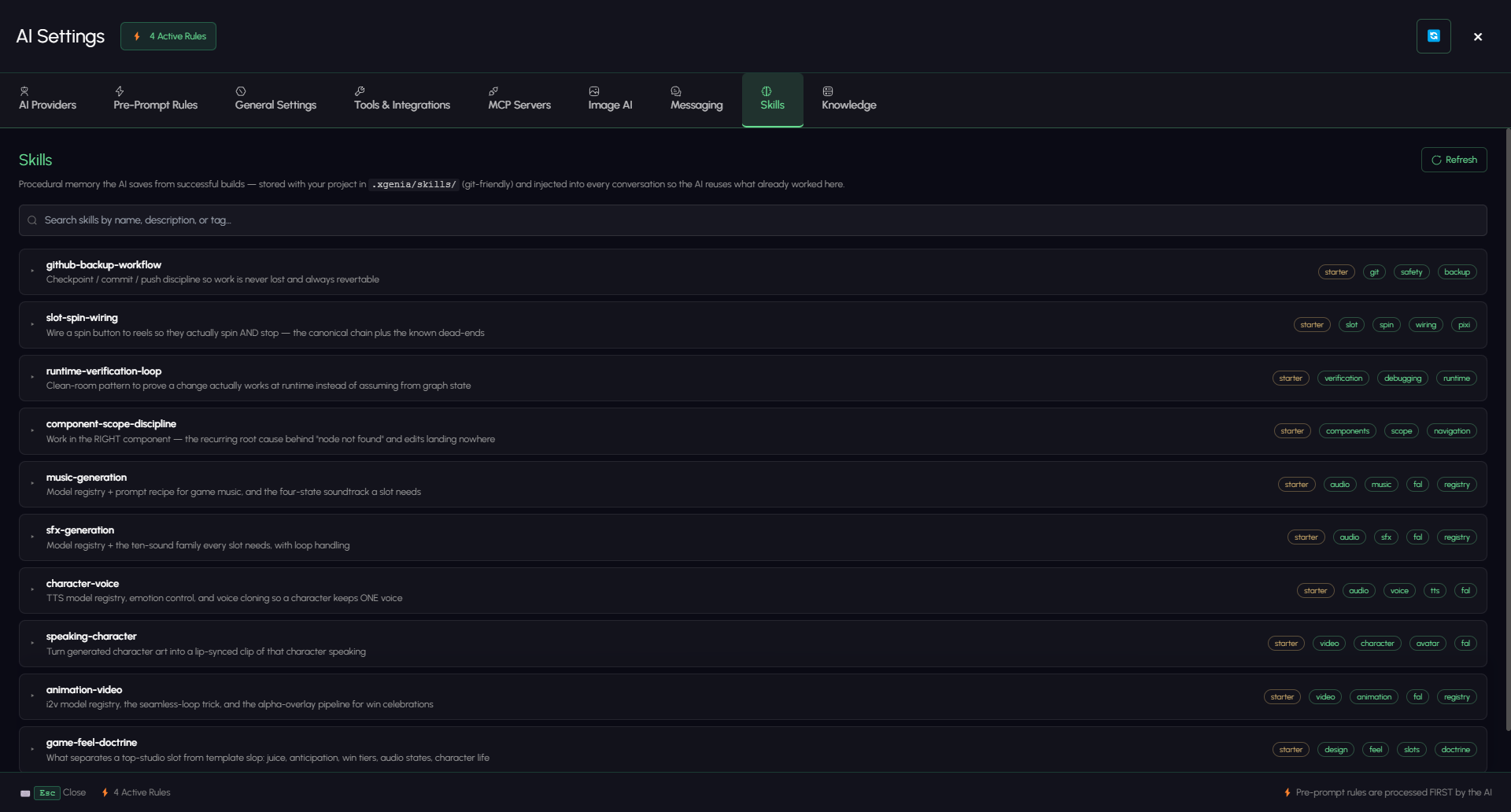
A skill is procedural memory: a recipe the AI reuses instead of rediscovering. Open the Provider & Tools gear, then the Skills tab.
Search by name, description, or tag. Each card expands to show the skill, carries its tags, and can be deleted.
Where skills come from
| Source | Badge | Notes |
|---|---|---|
| Ships with XGENIA | starter | Built-in patterns. The shipped set covers github-backup-workflow (checkpoint / commit / push discipline), slot-spin-wiring, runtime-verification-loop (proving a change works at runtime instead of assuming from graph state), component-scope-discipline (the recurring root cause behind "node not found"), music-generation, sfx-generation, character-voice, speaking-character, animation-video, and game-feel-doctrine. |
| Saved from your builds | — | Captured from work that actually succeeded in this project. |
| Your override | override | A project skill with the same name as a starter — yours wins. |
Saving a skill
Two ways:
- Ask for it — after something works, say:
Save what you just did as a skill called "Reel spin wiring".
- Accept the offer — after a non-trivial build the AI is nudged to offer saving the pattern.
Save skills that are reusable. A one-off fix is not a skill; the way you always wire a spin button is.
Overriding a starter skill
If a built-in pattern does not match how your team works, save a project skill with the same name. It overrides the starter and the card is badged accordingly.
Knowledge
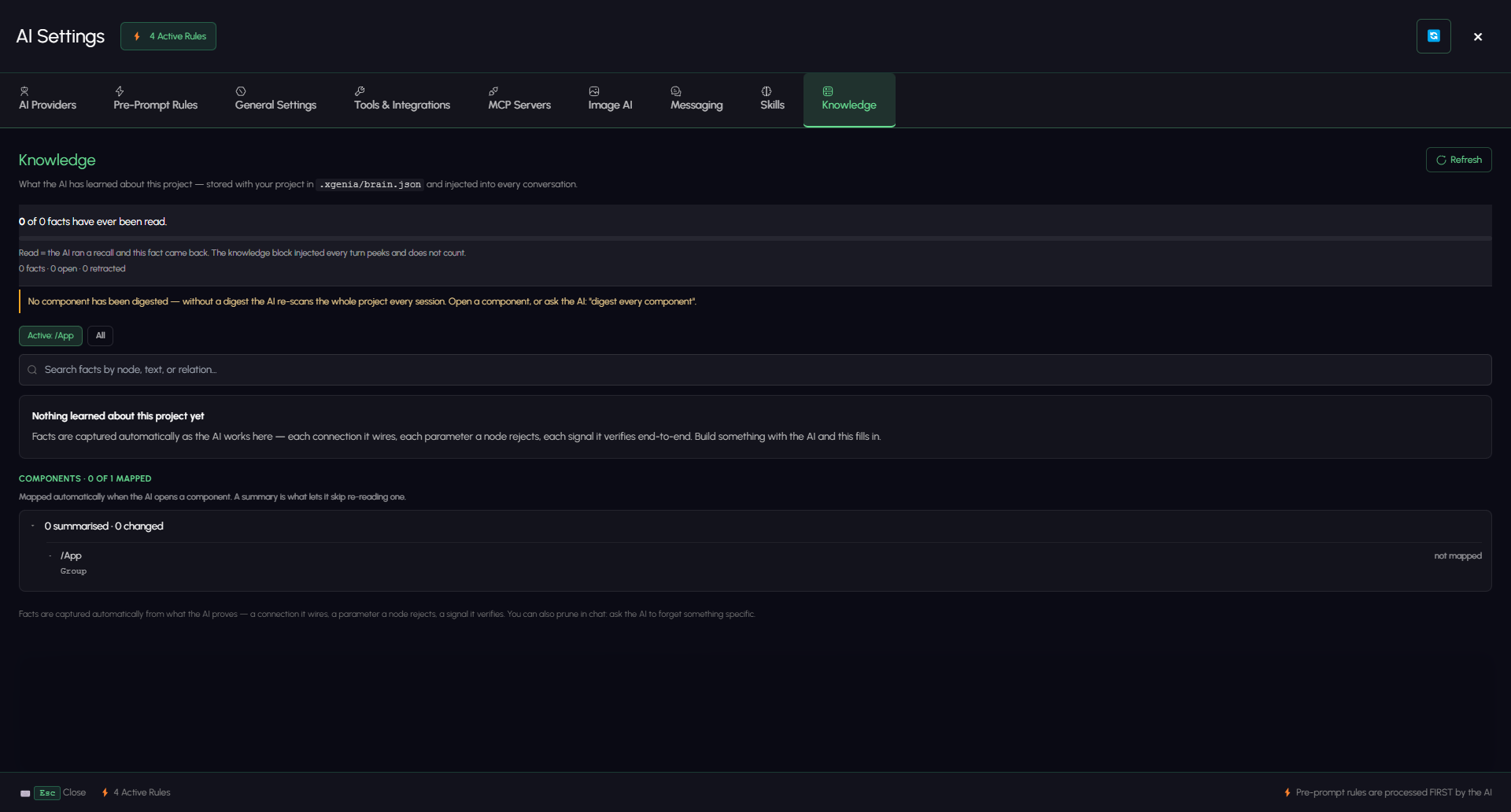
The Knowledge tab shows what the AI has learned about this specific project — component structure, what each component is for, and facts it has established along the way.
Reading the panel
| Reading | What it tells you |
|---|---|
| Facts | Total facts, how many are open, how many were retracted |
| Facts ever read | How many have actually been recalled. If this is zero with facts present, the AI is not consulting the store — worth investigating. |
| Components mapped | How many components the AI has scanned |
| Summarised | How many have a written description of what they do — the one thing a scan cannot derive |
| Changed | Components edited since they were mapped; the AI re-scans these |
Facts can be searched by node, text, or relation, filtered to one relation type, and scoped to the active component or all of them.
The panel also flags the expensive gap: no component has been digested — without a digest the AI re-scans the whole project every session. If you see that, you are paying for a full re-scan on every conversation. One prompt fixes it: "digest every component".
The panel is deliberately honest about gaps. If it cannot read the store it says so rather than showing a zero — a zero over a broken read would be a lie, and the AI may still be using facts the panel cannot display.
Improving what it knows
- Ask it to map the project. "Go through every component and summarise what each one does."
- Correct it directly. If a fact is wrong, say so — the AI can retract it.
- Refresh re-reads the store after a change.
A well-populated knowledge store is the difference between an assistant that asks what GameRoot is every session and one that already knows.