Models & Providers
The XGENIA AI Agents is in early alpha. Model lists and settings change often.
Open the Provider & Tools gear in the panel header to bring up AI Settings, then the AI Providers tab.
OpenRouter is the provider
XGENIA reaches every model through a single provider: OpenRouter. There is no separate OpenAI, Anthropic, Google, or custom-endpoint option, and you do not need an account with each vendor.
That means one key covers everything — Claude, GPT, Gemini, DeepSeek, Qwen, Llama, and the rest.
It starts with sk-or-. Get it from openrouter.ai/keys. A key from a model's own vendor will be rejected no matter which model you select.
Paste the key and click Test & Save. The panel verifies it against OpenRouter and then loads the live model catalogue. Credit is billed to your OpenRouter account; the remaining balance shows in the context bar.
Choosing a main model
The model list is fetched live, so it always reflects what OpenRouter currently offers.
- The header shows how many are available (several hundred) with a Refresh button.
- Search by name, vendor, or type.
- Filter by family — All, Free, Claude, GPT, Llama, Gemini, Mistral, Cohere, Perplexity, DeepSeek, Qwen, Yi, Phi, Neural, Solar, TinyLlama, OpenChat, Nous, Dolphin, Wizard, Vicuna, Alpaca, Koala, Dolly.
- Click a model to make it your main model.
Every card carries its provider, context length, a FREE / Free Tier / Paid Only badge, a one-line description, and input/output cost per 1K tokens.
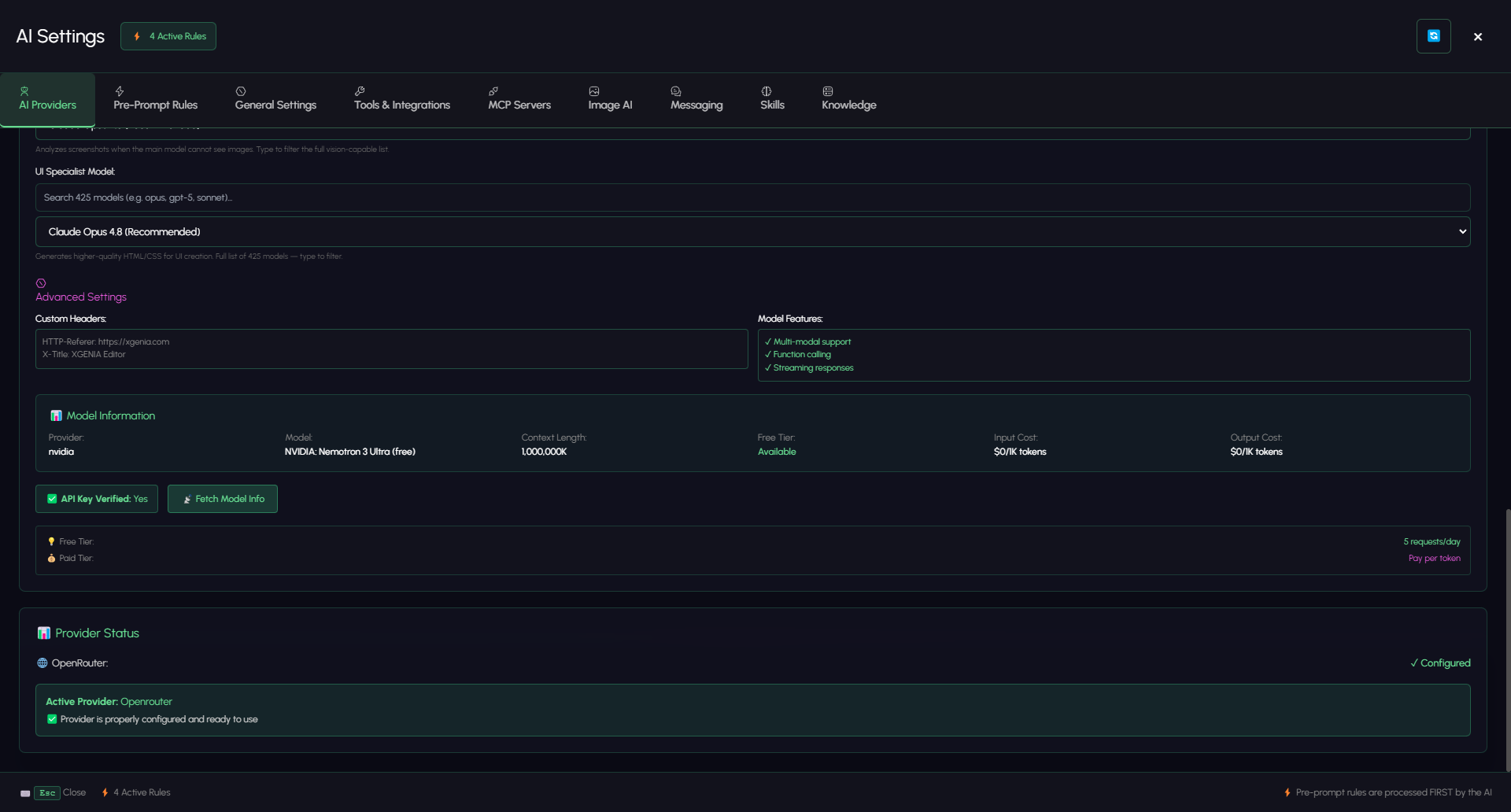
Selecting one fills in the Model Information panel below: provider, model, context length, free-tier availability, and input and output cost. Fetch Model Info refreshes it, and a Free Tier / Paid Tier line spells out the request limit and billing mode.
Which model should you pick?
Building in XGENIA is a long tool-calling session, not a single question. The model has to hold a plan across dozens of steps, read a node graph, and notice when its own change broke something.
| Situation | Suggestion |
|---|---|
| Real building work | A top-tier reasoning model — Claude Opus or Sonnet class. This is what the assistant is tuned for. |
| Quick questions, cheap edits | A mid-tier model is fine, and noticeably cheaper. |
| Experimenting with no budget | A model from the Free filter — expect it to lose the plot on anything complex. |
Switching mid-conversation is fine: use the model name at the bottom of the panel for a quick menu of recent models.
Sub-agents
Some jobs need a model the main one cannot do. Two specialists sit behind the main model and are dispatched automatically.
| Sub-agent | Job | Notes |
|---|---|---|
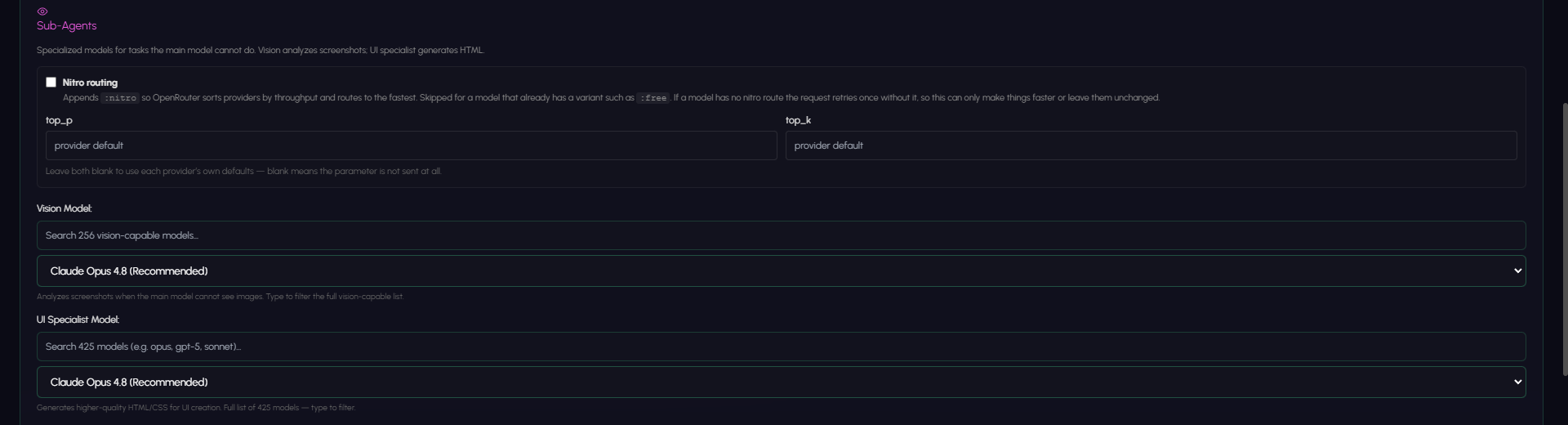
| Vision Model | Looks at screenshots and describes what is actually on screen | Only vision-capable models are listed. Used when the main model cannot see images, and as an independent check on what the AI claims it built. |
| UI Specialist Model | Generates HTML/UI layouts that are then translated into XGENIA nodes | Set to None (disabled) to turn it off. |
Both dropdowns have a search box above them, so you can filter the full catalogue rather than scrolling — the vision list is restricted to vision-capable models, the UI specialist list is the whole catalogue. Both default to a recommended Claude Opus build.
The vision sub-agent is why a reply sometimes carries a warning banner: it looked at the screenshot and disagreed with the main model's account of it. See Images & Vision.
Routing & sampling

| Setting | What it does |
|---|---|
| Nitro routing | Appends :nitro so OpenRouter sorts providers by throughput and routes to the fastest one. Skipped for models that already carry a variant such as :free. If a model has no nitro route, the request retries once without it — so this can only make things faster or leave them unchanged. On by default. |
| top_p | Nucleus sampling cutoff (0–1). Leave blank. |
| top_k | Limits sampling to the k most likely tokens. Leave blank. |
Blank does not mean zero — it means the parameter is not sent at all, and the provider's own default applies.
Leave top_p and top_k alone unless you have a specific reason. Provider defaults are tuned for tool calling, and unusual sampling makes long builds less reliable, not more creative.
Provider status
Under Advanced Settings the tab shows the headers XGENIA sends (HTTP-Referer: https://xgenia.com, X-Title: XGENIA Editor) and the feature set in use — multi-modal support, function calling, streaming responses — alongside an API Key Verified indicator.
The Provider Status block at the bottom is the one-line answer: Active Provider: Openrouter — Provider is properly configured and ready to use, or the reason it is not.
If the model name at the bottom of the chat has a red dot, this is the tab to check.