Using XGENIA Deploy Options for Vercel
What you will learn in this guide
In this guide you will learn how to use XGENIA deploy options to deploy your project directly to Vercel hosting platform. XGENIA provides an integrated deployment interface that streamlines the process of getting your frontend applications live on Vercel.
The XGENIA tab always publishes through the RGS path. Before you can deploy you must be connected to XGENIA RGS and have a game selected, both in the Maths RGS panel — Publish stops and tells you if either is missing. There is no "Connected cloud services" picker on this tab any more, and no separate Compile step.
There is also no game picker in this dialog: the game comes from the Maths RGS panel, because the endpoints baked into the build already belong to one specific game.
For what Publish does to your graph — swapping deployed component instances for calls to their live endpoints, and the warnings it raises — see Publishing a game to RGS.
Step 1: Enter Your Domain Name
To begin deploying your project to Vercel through XGENIA:
- Click the Publish button at the top right of the editor
- Stay on the XGENIA tab
- In the "Domain Name" field, enter your desired domain name without the
.vercel.appsuffix — it is added for you
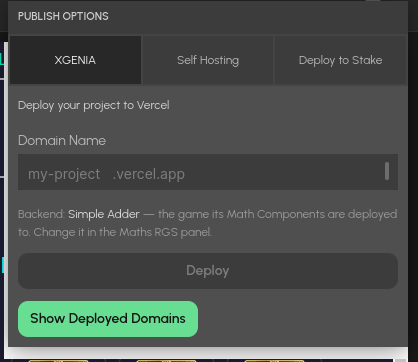
The popup names the backend game your maths components are deployed to. Change it in the Maths RGS panel if it is the wrong one.
Example: If you want your app to be accessible at my-awesome-app.vercel.app, enter my-awesome-app in the domain name field.
Step 2: Start the Deployment
Once you've entered your domain name:
- Click the Deploy button to initiate the deployment process
- You'll see a "Deploying..." message indicating that the deployment is in progress
- The system will show "This process may take 2-3 minutes to complete."
Important: Do not close the deployment window during this process. The deployment includes building your project, optimizing assets, and configuring the Vercel hosting environment.
Step 3: View Your Deployed Domains
After the deployment completes successfully:
- Click the Show Deployed Domains button
- This will open a panel showing all your active deployments
- You'll see a list of previously deployed domains with their creation dates
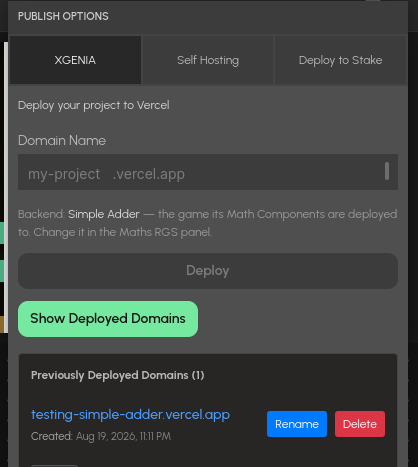
Previously Deployed Domains lists each deployment with its creation date and Rename and Delete buttons.
The deployed domains list shows:
- Domain name (e.g.,
test-hello-world-project.vercel.app) - Creation date and time
- Management options for each deployment
Step 4: Managing Your Deployments
Renaming a Domain
If you want to change the domain name of an existing deployment:
- In the deployed domains list, find the deployment you want to rename
- Click the Rename button next to the domain
- Enter the new domain name, then click Save button
- The rename will be applied directly to the deployment without requiring a full redeploy
Deleting a Deployment
To remove a deployment that you no longer need:
- In the deployed domains list, locate the deployment you want to remove
- Click the Delete button next to the domain
- The deployment will be permanently removed from Vercel
Warning: Deleting a deployment is permanent and cannot be undone. Make sure you have backups if needed.
What happens to the backend
Deleting a domain does not delete the Server Version its maths lives in. Deployed Maths Components are managed in the Maths RGS panel and may be shared by more than one frontend, so removing a frontend must not remove them.
Records written by the older publish flow do carry backend links, and deleting those domains still deletes the linked versions. If that cannot complete — you are not connected to RGS, or the delete fails — the domain stays listed so you can retry, and the message names the version so you can remove it by hand from the Maths RGS panel.
Best Practices
Domain Naming
- Use descriptive, memorable domain names
- Avoid special characters and spaces
- Keep names concise but meaningful
- Consider including version numbers for staging deployments
Deployment Management
- Regularly clean up unused deployments to keep your list organized
- Use meaningful names that indicate the purpose or version of each deployment
- Test your deployments before sharing the URLs with others
Troubleshooting
If your deployment fails:
- Check Domain Availability: Ensure your chosen domain name isn't already taken
- Project Size: Large projects may take longer to deploy
- Network Connection: Ensure you have a stable internet connection during deployment
- Project Dependencies: Verify all project dependencies are properly configured