XGENIA RGS
XGENIA can run your game's maths on a remote game server (RGS) instead of in the player's browser. The Maths RGS panel in the editor's left sidebar is where that happens.
The idea is a clean split:
- The frontend — reels, buttons, animation — stays an ordinary XGENIA project, published to Vercel.
- The maths — RNG, paytable, win calculation — is authored as components in the editor and deployed to the platform as backend functions. The published game calls them over HTTP.
This is what makes a game auditable: the player's browser never holds the code that decides the outcome, and the platform records every round the backend serves.
Players load the game from Vercel; the maths they can never see runs on the platform.
Everything in this section needs an operator API key. If you only build UI, you never need this panel — a project with no deployed components runs entirely in the browser, as XGENIA projects always have.
Watch the whole workflow
This five-minute screen recording follows a single component — a Multiplication function for a small calculator game — from an empty local component to a live REST call on the published site. It has no narration; the table underneath is the commentary.
The recording picks up with an operator key already connected and a game already selected. Connecting and Games below cover that first.
| Time | Step | What happens |
|---|---|---|
| 0:00 | Create a local component — Local tab | + on Local Components adds Multiplication. It is an ordinary component: it lives only in this project until it is deployed. |
| 0:30 | Give it ports and maths | The component gets a Do signal plus First Number and Second Number inputs, a Multiplication node wired between Component Inputs and Component Outputs, and Result and Success outputs. |
| 1:10 | Test it locally | The component is dropped onto the Start Page and wired to the two text inputs and the Calculate button. The preview answers 3 × 4 = 12 — computed in the browser. |
| 1:55 | Preview the change — Changed tab | Reads 1 change vs the deployed version · preview only, listing + Multiplication. This is the diff you are about to send, and nothing here touches the server. |
| 2:13 | Deploy it | Deploy 1 change uploads Multiplication project.json into server version v1 · simple-adder. The banner settles on ✓ v1 · 1 component deployed. |
| 2:25 | Read the commit — Commits tab | The deploy is recorded as a commit: Deploy multiplication component, its short id, who deployed it and which components it touched. Earlier deploys stay listed below it. |
| 2:31 | See what is live — Deployed tab | Now 2 live components · v1 · simple-adder · read-only. Opening one shows the exact graph the server is running. It cannot be edited from here. |
| 2:45 | Test the deployed component | The local node is swapped for the deployed one, dragged in from Deployed as an Aggregation Node. The preview answers 12 again — but this time the answer came back over HTTPS from the platform. |
| 3:45 | Publish the frontend — Publish button | Publish → XGENIA deploys the project to Vercel, here at test-simplest-calculator.vercel.app. The panel names the backend game the maths calls will be sent to. |
| 4:40 | Confirm on the live domain | On the published site, Calculate with 3 and 5. The browser's Network panel shows a single POST to the component's endpoint returning 200 and a JSON body of Result: 15. |
The two tests — at 1:10 and 2:45 — are the point of the whole exercise: the same graph, the same answer, first from the browser and then from the server. Everything between them is the deploy.
The pieces
| Term | Meaning |
|---|---|
| Operator | The owner of games on the platform. Identified by an API key (xrgs_…). |
| Game | A game registered on the platform, with a name, slug and mode. Maths components are deployed into a game. |
| Server Version | A numbered container of deployed functions for one game (v1, v2, …). |
| Maths Component | A component under the editor's maths sheet. Deploying it turns it into an HTTP endpoint. |
| Maths Version | A separate, test-only track used by the Test button. Never what players hit. |
Connecting
Open Maths RGS. The card at the top shows whether you are connected.
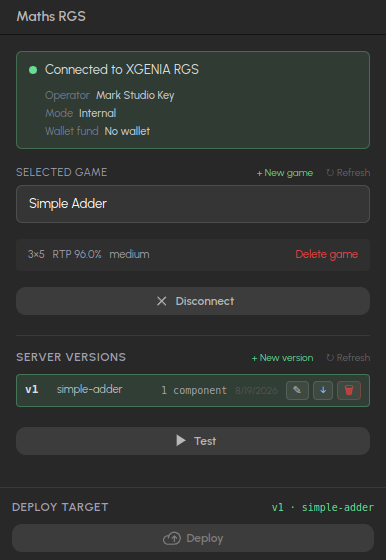
Connected. The card names the operator, its mode and wallet; below it the selected game with its reel size, RTP and volatility, the game's server versions, and the Test button.
- Have a key? Paste it (it starts with
xrgs_) and press Connect to XGENIA RGS. - Need one? Press Create operator & get key and fill the form:
| Field | Notes |
|---|---|
| Operator Name | Display name, e.g. Acme Casino. |
| Slug | URL-safe identifier, e.g. acme-casino. |
| Mode | Demo — play money. Live — real money. |
| Wallet Balance | Starting balance, in the first supported currency. |
| Supported Currencies | Comma-separated, e.g. EUR, USD, GBP. |
| Max Bet / Max Win (cents) | Limits in minor units (100 = 1.00). |
| IP Whitelist | Optional. |
The key is shown once, when the operator is created. Copy it and store it safely.
Once connected, the card shows the operator's name, mode and remaining wallet balance. Disconnect removes the stored key from this machine.
Games
With a key connected, the panel lists that operator's games.
- + New game — name, slug, description and mode.
- ↻ — refresh the list.
- Select a game to make it the target for everything below: Server Versions, deploys, and Publish.
- The trash icon deletes a game from the platform. The confirmation dialog spells out what is deleted with it — and what blocks the delete.
Game modes
A game's mode is about money, not readiness:
| Mode | Meaning |
|---|---|
| Demo | Play money — nothing real at stake. |
| Live | Real money. |
The operator's own mode is the ceiling: a demo key can only create demo games. Live and internal keys can create either. The backend enforces this — it is not just the dropdown.
Read-only routes a published game can call
Three GET routes on the component endpoint need no key and return nothing secret. The browser-side nodes in Slot Features use them, and your own JavaScript can too:
| Route | Returns |
|---|---|
/rgs-fn/{game}/__client-rules | The game owner's jurisdiction flags: autoplay, turbo, slam-stop and feature-buy allowed, stake cap, spin pacing, reality-check interval |
/rgs-fn/{game}/__jackpots | The game's active pools with their current values |
/rgs-fn/{game}/__leaderboard | The active tournament and a leaderboard with masked player names |
Translations come from GET /game-translations?lang=…&game_slug=….
Where to go next
- Maths Components — author and deploy the maths.
- Publishing a game to RGS — wire the frontend to the deployed endpoints.
- Testing and simulation — measure RTP on the deployed maths.
- Round tracking — how bets and wins reach Bet History.
- Compliance documents — generate the certification pack for a deployed build.
- Provably fair maths — the commit/reveal building blocks.