Testing and simulating maths
The Maths RGS panel offers two measurements. They answer different questions:
| Simulate | Test | |
|---|---|---|
| Where | Deployed tab → three-dot menu → Simulate | The Test button in the Maths RGS panel |
| Measures | The deployed component, exactly as players will hit it | A maths script run through the platform's stress test |
| Gives you | RTP, hit frequency, volatility, convergence charts | A pass/fail stress report against a declared RTP |
| Records anything? | No | Yes — it creates a Maths Version on the platform |
Simulate
Simulate measures a deployed component, on the platform. Nothing runs on your machine, so the numbers describe the exact code your players will hit — not a local working copy that might differ from it.
Open it from Maths RGS → Deployed → the row's ⋯ menu → Simulate. A simulation document opens in the main editor area with three parts:
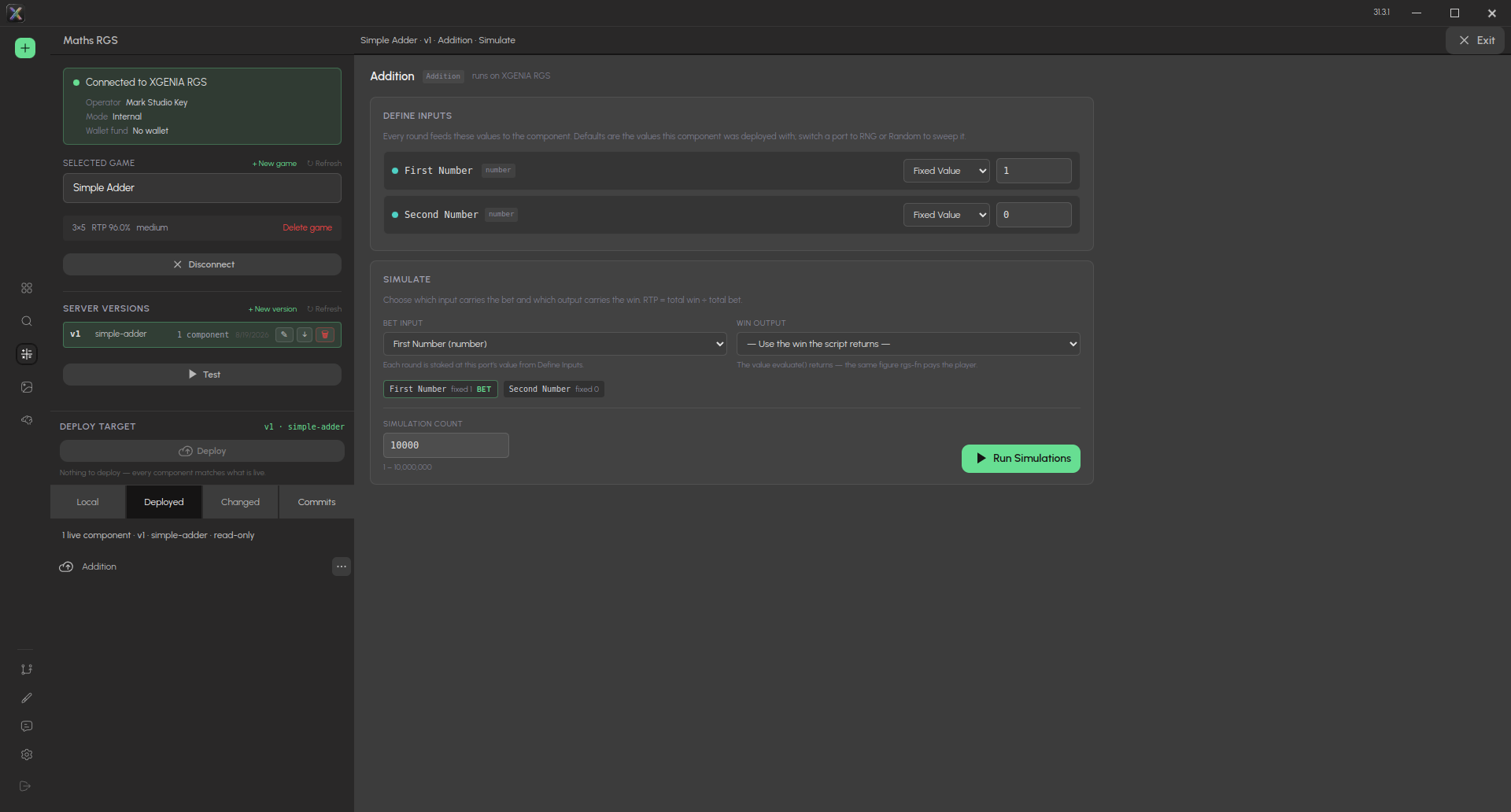
Simulating the deployed Addition component: Define inputs at the top, the bet and win mapping and the Simulation count below, Run Simulations to start. Exit (top right) returns to the graph.
1. Define inputs
Every request port of the deployed component is listed. By default, each port is set to the value the component was deployed with, so you can usually just press Run. Switch individual ports to a random mode when you want to sweep them:
| Port type | Options |
|---|---|
| Number | Fixed value, or a random Min–Max range per round |
| Boolean | True, False, or Random (50/50) |
| String | Fixed value, or a random name per round |
| Array / object | Fixed JSON |
The port acting as the stake is badged BET.
Leave ports at their fixed defaults unless you mean to sweep them. Randomizing every input — especially a game's UI toggles — doesn't test the maths; it drives the component into states no player can reach.
2. Bet Input and Win Output
These start at the mapping stored when the component was deployed (see the bet and win ports). You can run without them:
- No bet port — every round uses a flat stake instead.
- No win port — the win is whatever the script itself returns as the payout, which is also what the platform pays in production.
3. Run
Set a Simulation Count (up to 10,000,000) and press Run Simulations. Millions of rounds take a few minutes of server time; a progress bar tracks the run.
Long runs execute on the server as a series of short chunks. The running totals and the component's own state carry across chunk boundaries, so a free-spin feature that spans a boundary continues correctly.
Stop finishes the chunk in flight and keeps its rounds. The results then say explicitly that they cover only the rounds that ran.
Reading the results
Three headline tiles:
- Average RTP — total win ÷ total bet, with the house edge.
- Hit Frequency — the share of paid rounds that returned a win. A stake that pays out through the free spins it triggered counts as one hit.
- Volatility — how spread out the results are, with a class (low / medium / high).
Below them: total bet, total win, max multiplier, average bet per round — and, when the component has a bonus feature, a bonus row: bonus frequency, free rounds played, bonus RTP and average bonus win.
Convergence charts show all three headline figures settling as rounds accumulate. Nothing is persisted; every statistic is computed on the server from the rounds that ran.
Two failures the simulator reports honestly:
- RNG draws exhausted — the platform throws when one round uses more random draws than its budget. A component that only "worked" locally by silently reusing draws fails here, because it fails in production too.
- A bonus that never ends — free rounds are capped at 500 per feature. If the cap is hit, the component never clears
state.in_feature: its bonus cannot end on its own, and the results say how often it was cut short.
The same ⋯ menu also offers Compliance, which generates the certification documents for the build — see Compliance documents.
Test
Test takes the maths component you have open, compiles and uploads it, and runs the platform's stress test against it. In the Test Configuration dialog, set a Simulation Count (1,000–1,000,000) and start.
The result arrives as a toast with the version and its measured figures — for example: "Dark Alice → v3 tested (not live). RTP 96.12% · Hit 24.8% · Max 812×".
Test never puts maths live, whatever the dialog's summary text suggests. The pipeline is upload → activate for testing → stress test — and then it stops. Going live is a deliberately separate step.
Maths Versions
The Maths Versions list under the Test button shows the test lifecycle: draft → testing → approved → live. It is labelled (test only) for a reason:
A live row in this list is not what your game runs. Players hit the Server Version's deployed components — the ones under Server Versions and Deployed. The two lists are separate lifecycles and are easy to confuse.
The RTP column shows the measured figure from the stress run — never the declared one. If a version was never measured, it says "RTP unknown" rather than repeating a number someone hoped for.
There is no Promote to Live button, in the editor or in the RGS studio — promotion is switched off by design. A version at testing or approved can only go live by calling the platform's maths-deployer function directly (approve, then deploy).