Publishing a game to RGS
Publishing takes the project you have open, rewires every deployed Maths Component call to the live backend, builds the frontend, and deploys it to Vercel.
Press Publish in the top bar and stay on the XGENIA tab.
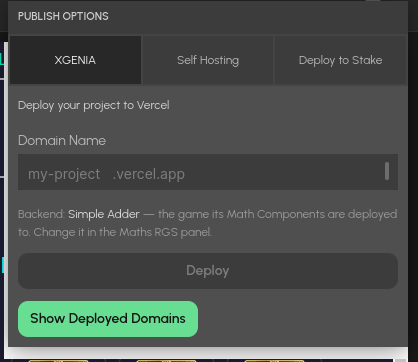
The Publish popup. The XGENIA tab names the backend game your maths components are deployed to — change it in the Maths RGS panel, not here.
Before you publish
Two things must be true, and Publish stops with a clear message if either is missing:
- You are connected to XGENIA RGS in the Maths RGS panel.
- A game is selected there.
There is no game picker in the Publish dialog: your maths was deployed into one specific game, and the endpoints baked into the build must match it.
There is no Compile step, and no isMath checkbox on nodes. Where code runs is decided by location: a deployed component under the maths sheet runs on the server; everything else runs in the browser.
What Publish does
- Copies the project on disk — publishing rewrites node graphs, and your open project must never be touched.
- Swaps deployed component instances for Aggregators. Every instance of a component deployed to the selected game becomes an Aggregator node calling its live
/rgs-fn/<game>/<slug>endpoint. - Repoints hand-placed Aggregators. An Aggregator dragged from the Deployed tab keeps the endpoint it had at drag time; if the component was renamed since, that URL serves the old code. Publish re-aims it at the current endpoint and reports how many it moved.
- Stamps the game onto the copy, so the deployed frontend knows which RGS game it belongs to.
- Builds and deploys to Vercel.
The warnings
Publish reports problems that would otherwise only show up in production:
| Warning | What to do |
|---|---|
| "nothing is wired to the trigger input of X" | The component can never call its backend. Wire a signal — a button's Click, say — to its Do port and publish again. |
| "X is not deployed to this game, so its maths will run in the player's browser" | The UI uses a Maths Component nobody deployed. Deploy it from Maths RGS → Math Components. |
| "N repointed at their current endpoint" | Hand-placed Aggregators were aimed at stale endpoints and have been moved. Worth reading — the publish changed which code the game calls. |
Domain name
Enter the domain without the suffix — my-awesome-game becomes my-awesome-game.vercel.app — and press Deploy. The build takes a few minutes; leave the window open.
The success toast reports the live URL and what was wired, e.g. "3 Math Component calls wired to Dark Alice".
Managing deployments
Show Deployed Domains lists your deployments with their creation and update times.
- Rename — changes the domain without a full redeploy.
- Delete — removes the deployment from Vercel. Permanent.
Deleting a domain does not delete the Server Version its maths lives in — several frontends may share it. Manage the backend in the Maths RGS panel.
Troubleshooting
Publishing and deleting need the platform's deploy credentials, which load when you connect to XGENIA RGS. If a publish or delete refuses to run, the error names the actual problem — most often not connected to XGENIA RGS. Connect in the Maths RGS panel and try again; no restart needed.
The other tabs
Self Hosting and Deploy to Stake are separate paths with their own settings. The XGENIA tab is pinned to the RGS flow described here.
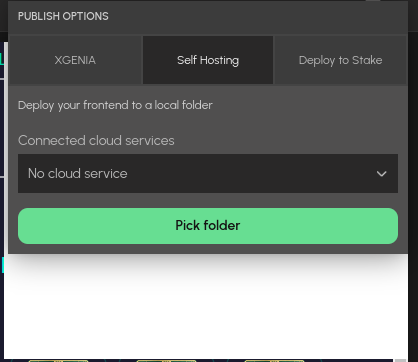
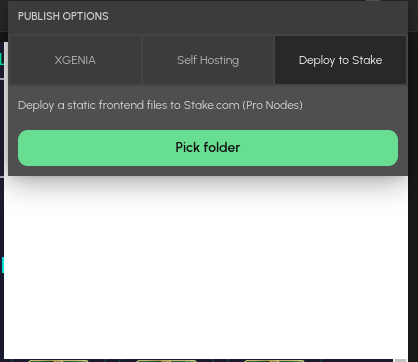
Self Hosting builds the frontend into a folder you pick, optionally wired to a stored cloud service. Deploy to Stake writes the static files Stake's platform expects.