Compliance documents
A game that goes to a regulator or an accredited test laboratory needs a pack of documents about the exact build being submitted. XGENIA RGS generates that pack on the platform, and you can produce it without leaving the editor.
Open Maths RGS → Deployed, press the ⋯ menu on a component and choose Compliance.
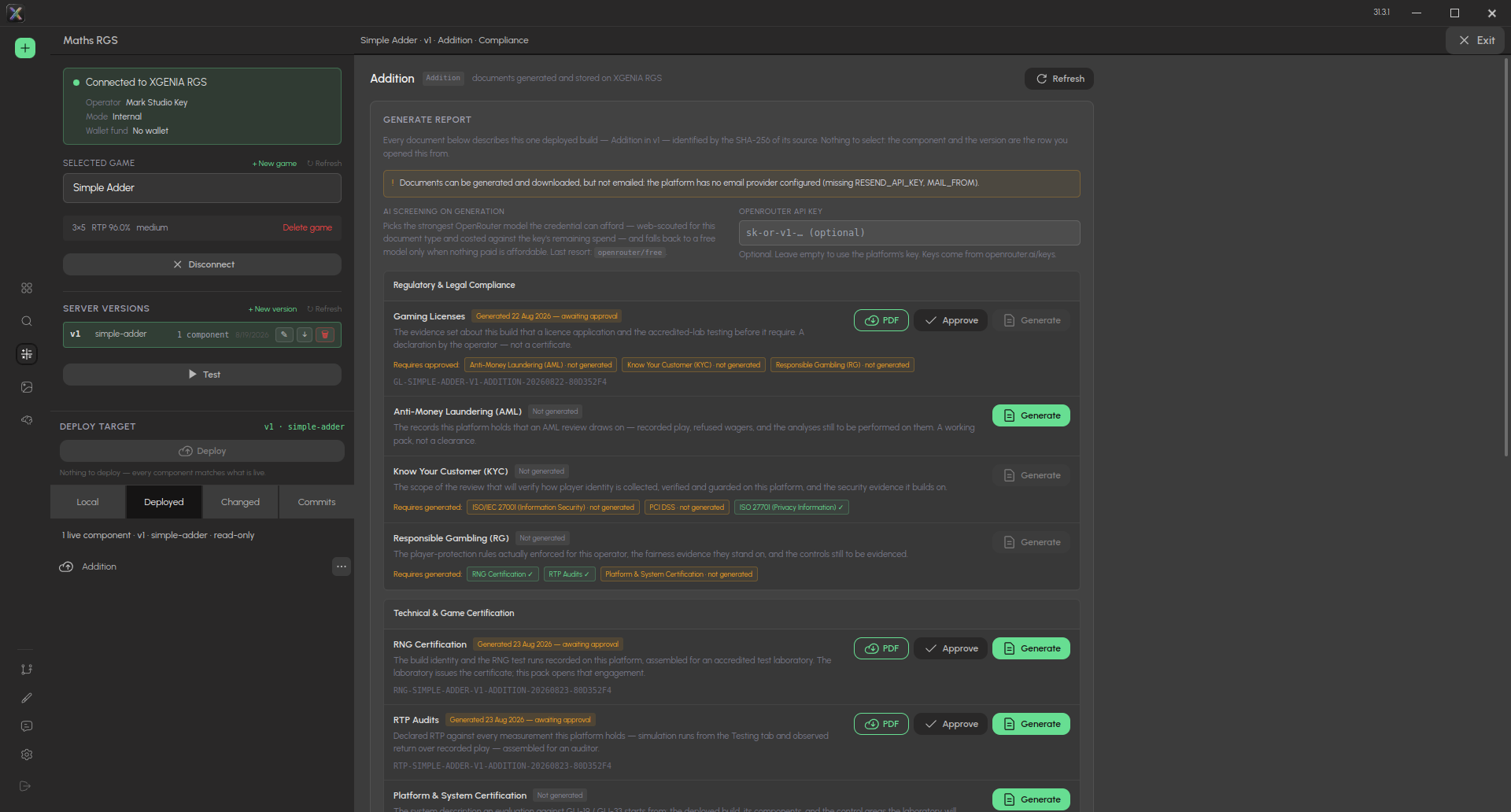
The Compliance view for the deployed Addition component: the ten catalogue documents in their groups, each with its status, prerequisites and actions. Exit (top right) returns to the graph.
Compliance is only offered for deployed components. Every document names the deployed source and its SHA-256, the operator's registered details, the market rules in force and the recorded play — none of which exists for a local working copy.
What the documents are — and are not
The platform never claims a licence, a certificate or a clearance. Each document is an honest evidence pack: every field is either a real value the platform holds, marked Not supplied when the operator has to provide it, or marked To be completed by the test laboratory / independent assessor. The laboratory or assessor issues the certificate; the pack opens that engagement.
The catalogue
| Group | Documents |
|---|---|
| Regulatory & Legal Compliance | Gaming Licenses · Anti-Money Laundering (AML) · Know Your Customer (KYC) · Responsible Gambling (RG) |
| Technical & Game Certification | RNG Certification · RTP Audits · Platform & System Certification |
| Industry-Standard & Security Certifications | ISO/IEC 27001 (Information Security) · PCI DSS · ISO 27701 (Privacy Information) |
Some documents build on others, and the platform enforces the order:
| Document | Needs first |
|---|---|
| Gaming Licenses | AML, KYC and Responsible Gambling — each approved. |
| Responsible Gambling | RNG Certification, RTP Audits and Platform & System Certification — each generated. |
| Know Your Customer | ISO/IEC 27001, PCI DSS and ISO 27701 — each generated. |
The other seven have no prerequisites. A row shows its prerequisites as chips — ✓ when satisfied, not generated or awaiting approval when not — and its Generate button stays disabled until they are met.
Generating, approving, downloading
Each row has a status chip — Not generated, Generated — awaiting approval or Approved — and up to three actions:
| Action | What it does |
|---|---|
| Generate | Builds the document on the platform from the deployed build and the platform's records, stores it, and shows it below the list. Generating again creates a new version; earlier ones stay in the history. |
| Approve | Marks the newest generated document as approved, with who approved it and when. Approval cannot be undone or overwritten. |
| Downloads the stored PDF — byte-identical to what the platform keeps and would email. |
The generated document is rendered from the same model the PDF was produced from, so what you read on screen is what is in the file. Generated documents at the bottom is the game's history: every generation, with download and approve per row.
AI screening
Every generation runs an automated screening pass — a language model reads the deployed source, the recorded play and the platform's test runs and writes a findings section into the document. It is a screening aid, clearly labelled as such, never a certifier.
The model is chosen per generation by a best-affordable rule: the strongest model the credential can pay for, falling back to a free model only when nothing paid is affordable. The document records which model ran and why.
- With the OpenRouter API key field empty, the platform's own key pays. That key is free-tier, so screening currently uses the best free model available.
- Paste your own OpenRouter key (
sk-or-…) to have that generation use the strongest model your key affords. The key is sent with the request and never stored.
Email
Documents can be emailed to the operator's compliance contact when the platform has an email provider configured. Until then the view says so, and PDF is the way to hand the document on.