XGENIA Slot Engine Layout Architecture
This comprehensive guide details the complete user interface structure of the XGENIA Slot Engine, focusing on the sophisticated Start Page layout and its intricate mapping to the underlying component systems defined in project.json. The layout represents a carefully designed user experience that balances accessibility with professional-grade functionality, providing both novice and expert users with intuitive access to powerful slot simulation capabilities.
Start Page Full Interface View
The Start Page serves as the comprehensive control center for the entire XGENIA Slot Engine, providing access to all configuration options, simulation controls, and real-time visualization capabilities.
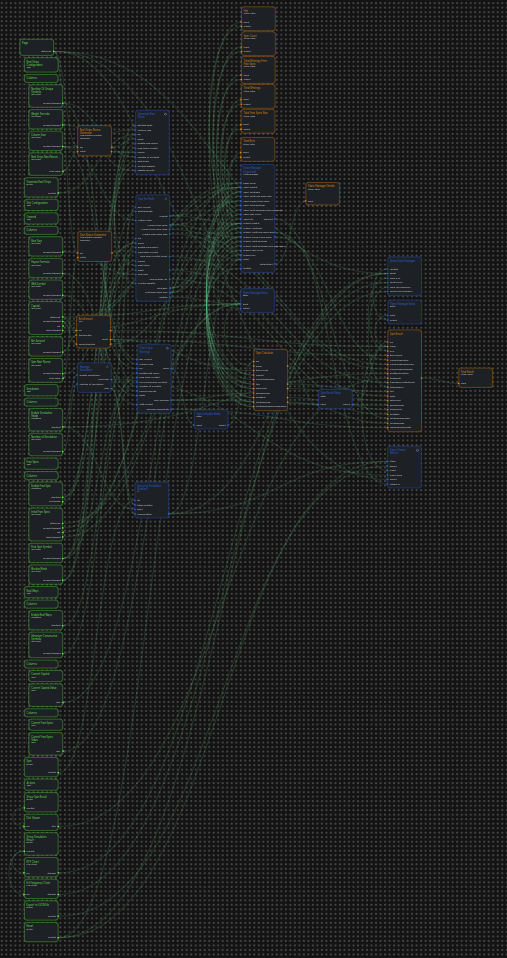
Complete Interface Architecture Analysis:
Left Panel - Comprehensive Configuration System (Green UI Controls):
- Page Component: Root container with didMount initialization and responsive layout management
- Configuration Input Grid: Systematically organized text inputs in 6-column responsive layout
- Reel Strips Configuration Section:
- Number Of Unique Symbols (default: "10")
- Weight Formula (default: "exp(-x / 15)")
- Column Size (default: "5")
- Reel Strips Next Nonce (auto-generated: "100")
- General Slot Configuration:
- Row Size (default: "3")
- Payout Formula (default: "2.25 + 0.75 * x")
- Wild Symbol (default: "9")
- Capital (default: "100000")
- Bet Amount (default: "100")
- Spin Next Nonce (auto-generated: "100")
- Free Spins Configuration:
- Enable Free Spin checkbox with margin and styling
- Initial Free Spins (default: "0")
- Free Spin Symbol (default: "10")
- Blocked Reels (default: "0,4")
- Reel Ways Configuration:
- Enable Reel Ways checkbox
- Minimum Consecutive Symbols (default: "3")
- Simulation Configuration:
- Enable Simulation Mode checkbox
- Number of Simulation (default: "100")
Central Processing Hub - Component Integration Area:
- Major Component Blocks: Large blue rectangular components representing core processing systems
- Generate Reel Strips: Mathematical foundation component with TRNG integration
- Spin the Reels: Weighted spinning mechanism with comprehensive state management
- Check Spin Winnings: Dual-mode win calculation with payline/reel-ways switching
- Manage Simulation: Batch processing coordination with loop management
- Export Game Metrics: Data collection and export system with JSON output
Right Panel - Real-time Visualization and Monitoring:
- Current Status Displays:
- Current Capital text display with real-time balance updates
- Current Free Spins counter with bonus round tracking
- Statistical Show Value Components:
- Total Bets display with cumulative wagering statistics
- Total Winnings display with aggregate win tracking
- Total Winnings From Free Spins with bonus-specific metrics
- Spin Count with total spin tracking
- Hits counter with winning spin frequency
- Advanced Visualization:
- RTP Line Chart with real-time percentage tracking and trend analysis
- Hit Frequency Line Chart with statistical smoothing and confidence intervals
- Result Analysis Tools:
- Dict Viewer for comprehensive spin result inspection
- State Manager Details for debugging and detailed state analysis
Detailed Node Graph Architecture
The underlying node graph architecture demonstrates the sophisticated interconnections between user interface elements and the mathematical processing systems. This comprehensive view reveals the complex data flow patterns that enable real-time statistical tracking, state management, and user interface updates.
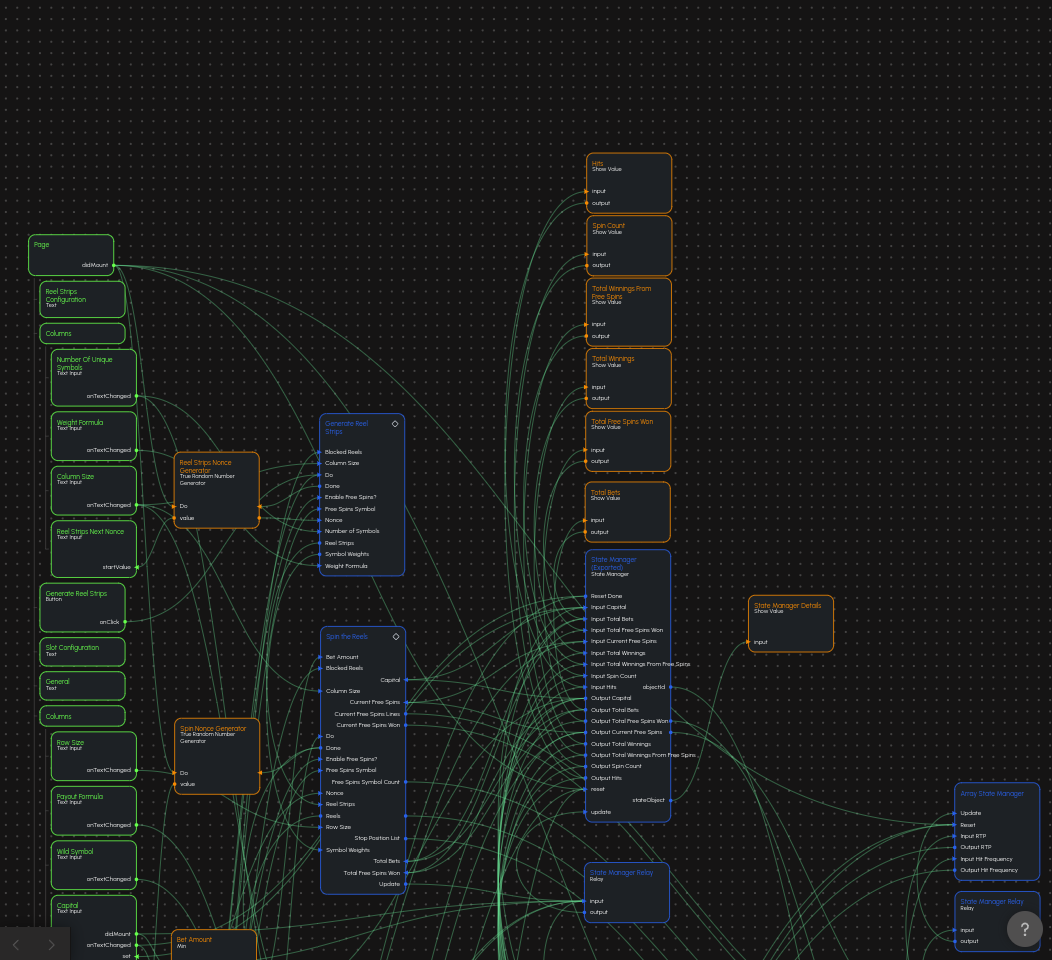
Detailed Architecture Components from Node Graph:
Central State Management System (Visible in Detail):
stateManager(Exported): Comprehensive KPI coordination hub- 8 Input/Output Channels: Bidirectional data flow for all critical game metrics
- Specific Port Mapping: input0-input7 and output0-output7 with corresponding aliases
- Alias Configuration: Capital, Total Bets, Total Free Spins Won, Current Free Spins, Total Winnings, Total Winnings From Free Spins, Spin Count, Hits
- Update/Reset Signals: Comprehensive state management with update and reset coordination
- Real-time Synchronization: Continuous data flow between all connected processing components
Advanced Statistical Data Management:
arrayStateManager: Time-series statistical collection system- 2 Input Channels: RTP (input0) and Hit Frequency (input1) data streams
- Alias System: "RTP" and "Hit Frequency" for clear data identification
- Chart Output: Direct array outputs (output0, output1) feeding Line Chart components
- Update/Reset Control: Coordinated statistical data management with state persistence
True Random Number Generation Infrastructure:
True Random Number Generator(Reel Strips Nonce): Dedicated TRNG for reel strip generation- Input: Min Value, Max Value configuration for range control
- Output: Random Value feeding directly to Generate Reel Strips component
True Random Number Generator(Spin Nonce): Dedicated TRNG for individual spin operations- Input: Configurable range for spin seed generation
- Output: Random Value feeding Spin the Reels component for unique spin execution
Component Integration Mapping:
- Generate Reel Strips: Connected to TRNG for nonce generation and weight formula processing
- Spin the Reels: Integrated with state management for KPI updates and balance tracking
- Check Spin Winnings: Feeds winning data to both individual result display and statistical aggregation
- Export Game Metrics: Collects data from Array State Manager for comprehensive JSON export
User Interface Bindings:
- Text Input Controls: Direct binding to component inputs with real-time validation
- Button Controls: Event-driven triggers for component execution and state updates
- Display Components: Real-time data binding from state managers and calculation results
- Chart Components: Dynamic data visualization with automatic scaling and formatting
Data Flow Patterns (Visible in Detailed View):
- Green Connection Lines: Represent data flow from inputs to processing nodes and outputs
- Signal Propagation: Event-driven signals cascade through the system triggering sequential operations
- State Synchronization: Bidirectional data flow between State Manager and all statistical components
- Real-time Updates: Continuous data streaming from calculation components to visualization elements
Performance Optimization Features:
- Relay Nodes: Strategic placement for data buffering and flow control
- Conditional Logic: If/Then nodes optimize processing by bypassing unnecessary calculations
- Batch Processing: Array State Manager efficiently handles large datasets for statistical analysis
- Memory Management: State managers provide efficient storage and retrieval of historical data
Integration Complexity:
- Multi-layered Architecture: UI elements, business logic, and data storage operate in coordinated layers
- Event-driven Design: User actions trigger cascading updates throughout the entire system
- Statistical Convergence: Real-time analysis of mathematical accuracy and performance metrics
- Export Coordination: Seamless integration between live data and comprehensive export functionality
Comprehensive System Architecture View
This complete system view reveals the full complexity of the XGENIA Slot Engine, showing all components, connections, and data flow patterns in their complete operational context.
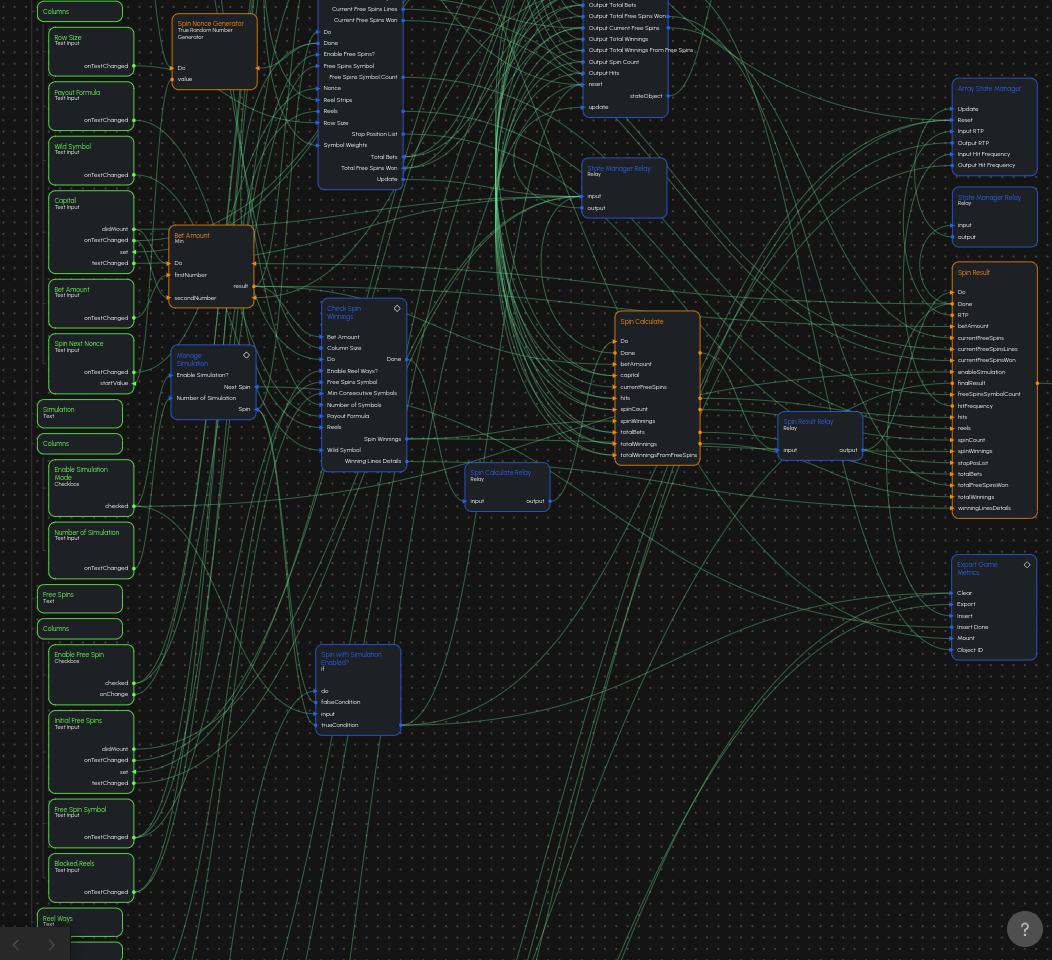
Complete System Architecture Analysis:
Comprehensive Component Network (Visible in Full System View):
Left Panel UI Controls (Green Nodes):
- Page: Root container with didMount initialization
- Columns Layout: 6-column responsive grid for organized input arrangement
- Text Input Controls: Multiple onTextChanged handlers for real-time parameter updates
- Number Of Unique Symbols, Weight Formula, Column Size (Reel Strips section)
- Row Size, Payout Formula, Wild Symbol, Capital, Bet Amount (General section)
- Initial Free Spins, Free Spin Symbol, Blocked Reels (Free Spins section)
- Number of Simulation (Simulation section)
- Checkbox Controls: Enable Free Spin, Enable Reel Ways, Enable Simulation Mode
- Button Controls: Generate Reel Strips, Spin, Show Spin Result, Show Simulation Result, Export to JSON File, Reset
Central Mathematical Processing (Blue/Orange Components):
- Generate Reel Strips Component: Mathematical foundation with symbol weight generation and reel strip creation
- Spin the Reels Component: Weighted reel execution with comprehensive state management integration
- Check Spin Winnings Component: Dual-mode win calculation supporting both paylines and reel-ways mechanics
- Manage Simulation Component: Batch processing coordination with sophisticated loop management
- Export Game Metrics Component: Data collection and JSON export with comprehensive metadata
State Management Infrastructure (Central Area):
- stateManager: 8-channel KPI tracking with bidirectional data flow and real-time updates
- arrayStateManager: Time-series data collection for statistical visualization and trend analysis
- Relay Nodes: Strategic data buffering and flow control throughout the processing pipeline
- Min Node: Financial validation ensuring bet amounts don't exceed available capital
Right Panel Visualization System:
- Show Value Components: Individual metric displays for Total Bets, Total Winnings, Spin Count, Hits
- Line Chart Components: RTP and Hit Frequency visualization with real-time data feeds
- Dict Viewer: Comprehensive result inspection with hierarchical data display
- State Manager Details: Complete state object visualization for debugging and analysis
Detailed Connection Patterns from Comprehensive View:
Data Flow Network (Green Connection Lines):
- Input Propagation: User interface controls → Component inputs → Mathematical processing
- State Updates: Processing results → State managers → Display components → Charts
- Feedback Loops: State manager outputs → Component inputs → Updated calculations
- Export Coordination: Array state manager → Export metrics → JSON file generation
Component Interconnection Analysis:
- Generate Reel Strips → Spin the Reels: Symbol Weights and Reel Strips data transfer
- Spin the Reels → Check Spin Winnings: Reels data and state information propagation
- Check Spin Winnings → State Managers: Winning data feeding statistical aggregation
- State Managers → UI Displays: Real-time KPI updates to all visualization components
Advanced Processing Pipeline (Visible Workflow):
- Configuration Phase: UI inputs → True Random Number Generators → Component parameters
- Generation Phase: Generate Reel Strips → Symbol weights and reel strip creation
- Execution Phase: Spin the Reels → Weighted spinning with state management
- Analysis Phase: Check Spin Winnings → Win calculation with dual-mode support
- Aggregation Phase: State managers → Statistical data collection and trend analysis
- Visualization Phase: Charts and displays → Real-time performance monitoring
- Export Phase: Export Game Metrics → Comprehensive JSON data export with metadata
System Integration Complexity:
- Multi-layered Data Flow: Simultaneous processing across UI, business logic, and data layers
- Real-time Coordination: Continuous synchronization between all system components
- Performance Optimization: Strategic relay placement for efficient data buffering
- Error Handling: Comprehensive validation and error recovery throughout the pipeline
Technical Implementation Insights from New Architecture Views:
Node Classification System (Color-Coded Architecture):
- Green UI Controls: Input elements with onTextChanged handlers and validation
- Blue Processing Components: Core mathematical and simulation processing blocks
- Orange State Management: stateManager and arrayStateManager coordination systems
- Purple Visualization: Line Charts, Show Value, and Dict Viewer display components
Specific Technical Details Extracted:
State Manager Configuration (Visible in Detail):
- 8 Input/Output Pairs: input0-input7 and output0-output7 with specific aliases
- Exact Aliases: "Capital", "Total Bets", "Total Free Spins Won", "Current Free Spins", "Total Winnings", "Total Winnings From Free Spins", "Spin Count", "Hits"
- Update/Reset Signals: Comprehensive state coordination with update and Reset Done signals
- Bidirectional Flow: Real-time synchronization between inputs and outputs
Array State Manager Specifications:
- 2 Input Channels: input0 (RTP), input1 (Hit Frequency) with corresponding aliases
- Array Outputs: output0 (RTP array), output1 (Hit Frequency array) feeding charts
- Statistical Processing: Automatic data aggregation with update and reset control
- Chart Integration: Direct connection to Line Chart components for real-time visualization
True Random Number Generator Network:
- Dual TRNG System: Separate generators for reel strips and spin operations
- Range Configuration: Min Value and Max Value inputs for controlled randomness
- Component Integration: Direct feeds to Generate Reel Strips and Spin components
- Deterministic Override: Manual value input capability for testing scenarios
Detailed Component Port Mapping (Extracted from Images):
Generate Reel Strips Component Ports:
- Inputs: Number of Symbols, Weight Formula, Nonce, Column Size, Free Spins Symbol, Enable Free Spins?, Blocked Reels, Do
- Outputs: Symbol Weights, Reel Strips, Done
- Internal Processing: Generate Symbol Weights → ISAAC RNG Array → Reel Strips Generator → Optional Init Free Spins
Spin the Reels Component Ports:
- Inputs: Column Size, Row Size, Nonce, Reel Strips, Symbol Weights, Capital, Total Bets, Current Free Spins, Total Free Spins Won, Bet Amount, Blocked Reels, Free Spins Symbol, Enable Free Spins?, Do
- Outputs: Reels, Stop Position List, Capital, Total Bets, Current Free Spins, Total Free Spins Won, Free Spins Symbol Count, Current Free Spins Won, Current Free Spins Lines, Done, Update
Check Spin Winnings Component Ports:
- Inputs: Number of Symbols, Column Size, Min Consecutive Symbols, Payout Formula, Wild Symbol, Free Spins Symbol, Reels, Bet Amount, Enable Reel Ways?, Do
- Outputs: Spin Winnings, Winning Lines Details, Done
Manage Simulation Component Ports:
- Inputs: Enable Simulation?, Spin, Number of Simulation, Next Spin
- Outputs: Spin (repeated for batch processing)
Export Game Metrics Component Ports:
- Inputs: Insert, Object ID, Export, Mount, Clear
- Outputs: Insert Done, Export Done
Specific UI Control Details from Images:
Text Input Control Specifications (Visible Properties):
- Number Of Unique Symbols: startValue="10", placeholder="10", width=150px, marginBottom=15px
- Weight Formula: startValue="exp(-x / 15)", placeholder="exp(-x / 15)", width=150px
- Column Size: startValue="5", placeholder="5", width=150px
- Row Size: startValue="3", placeholder="3", width=150px
- Payout Formula: startValue="2.25 + 0.75 * x", placeholder="2.25 + 0.75 * x", width=150px
- Wild Symbol: startValue="9", placeholder="9", width=150px
- Capital: startValue="100000", placeholder="100000", width=150px
- Bet Amount: startValue="100", placeholder="100", width=150px
- Initial Free Spins: startValue="0", placeholder="0", width=150px
- Free Spin Symbol: startValue="10", placeholder="10", width=150px
- Blocked Reels: startValue="0,4", placeholder="0,4", width=150px
- Minimum Consecutive Symbols: startValue="3", placeholder="3", width=150px
- Number of Simulation: startValue="100", placeholder="100", width=150px
Checkbox Control Specifications:
- Enable Free Spin: marginBottom=15px, marginTop=25px, marginLeft=10px
- Enable Reel Ways: marginBottom=15px, marginLeft=10px, marginTop=25px
- Enable Simulation Mode: marginBottom=15px, marginTop=25px, marginLeft=10px
Button Control Specifications:
- Generate Reel Strips: marginBottom=30px
- Spin: marginBottom=30px
- Show Spin Result: marginBottom=30px
- Show Simulation Result: marginBottom=30px
- Export to JSON File: marginBottom=30px
- Reset: marginBottom=30px
Chart Component Specifications (Visible in Architecture):
- RTP Line Chart: title="RTP", xLabel="No. of Spin", yLabel="%", sizeMode="contentHeight", marginBottom=15px
- Hit Frequency Line Chart: title="Hit Frequency", xLabel="No. of Spin", yLabel="%", sizeMode="contentHeight", marginBottom=15px
Comprehensive Interface Architecture
1. Reel Strips Configuration Section
This critical section controls the mathematical foundation of the slot machine through sophisticated reel strip generation.
Input Controls and Their Functions:
-
Number Of Unique Symbols(Default: 10)- Defines the total symbol set available for the game
- Range: 1-15 symbols for optimal mathematical balance
- Directly impacts game volatility and winning frequency
- Connected to
Generate Symbol Weightsnode for probability calculations
-
Weight Formula(Default: "exp(-x / 15)")- Mathematical expression controlling symbol probability distribution
- Supports complex formulas: exponential, polynomial, logarithmic functions
- Examples: "exp(-x / 10)" (high volatility), "1 / (x + 1)" (linear decay)
- Real-time validation ensures mathematical correctness
-
Column Size(Default: 5)- Number of reels in the slot machine grid
- Standard configurations: 3 (classic), 5 (modern), 6+ (megaways)
- Affects total possible winning combinations exponentially
- Synchronized with payline generation and ways-to-win calculations
-
Reel Strips Next Nonce(Auto-generated)- Cryptographic seed for deterministic reel strip generation
- Uses True Random Number Generator for unpredictable seeds
- Enables reproducible testing when manually set
- Critical for regulatory compliance and mathematical verification
Action Button:
Generate Reel Strips- Triggers complex mathematical pipeline:
Generate Reel Strips - Executes
Generate Symbol Weights→ISAAC Random Number Array Generator→Reel Strips Generator - Produces normalized
Symbol Weightsand balancedReel Strips - Includes optional
Init Free Spinsconfiguration when free spins are enabled
- Triggers complex mathematical pipeline:
2. Comprehensive Slot Configuration Section
This section defines core game mechanics and financial parameters.
General Game Parameters:
-
Row Size(Default: 3)- Visible symbols per reel (height of the game grid)
- Common configurations: 3 (standard), 4 (enhanced), 5+ (special features)
- Directly impacts visual presentation and winning potential
- Affects memory requirements and rendering performance
-
Payout Formula(Default: "2.25 + 0.75 * x")- Mathematical expression defining win multipliers based on symbol count
- Variable 'x' represents number of matching symbols in a winning combination
- Examples: "3 * x" (linear), "x^2" (exponential growth), "5 + 2*x" (base + multiplier)
- Validated for mathematical consistency and reasonable payout ranges
-
Wild Symbol(Default: 9)- Symbol ID that substitutes for other symbols in winning combinations
- Typically assigned to the highest-value symbol for maximum impact
- Supports complex wild behaviors: expanding, sticky, multiplier wilds
- Critical for bonus feature activation and enhanced winning potential
Financial Controls:
-
Capital(Default: 100,000)- Starting balance for simulation and testing scenarios
- Supports ranges from 1 to 10,000,000+ for various testing scales
- Real-time updates during gameplay with win/loss tracking
- Includes automatic bet clamping to prevent overdraft conditions
-
Bet Amount(Default: 100)- Wager amount per spin with automatic validation
- Dynamically limited by available capital using
Minnode - Supports fractional betting for precise mathematical testing
- Integrated with payout calculations for accurate win computations
-
Spin Next Nonce(Auto-generated)- Unique seed for each spin operation ensuring randomness
- Generated by True Random Number Generator for unpredictability
- Enables deterministic replay when manually specified
- Essential for audit trails and mathematical verification
3. Advanced Simulation Management
Powerful batch processing capabilities for comprehensive mathematical analysis.
Simulation Controls:
-
Enable Simulation Mode(Checkbox)- Activates automated batch spin processing
- Bypasses manual spin confirmation for high-speed testing
- Integrates with
Manage Simulationloop controller - Provides progress feedback during long-running simulations
-
Number of Simulation(Default: 100)- Defines batch size for automated simulation runs
- Supports ranges from 10 to 1,000,000+ spins
- Optimized for performance with progress tracking
- Results in comprehensive statistical convergence analysis
Simulation Flow Architecture:
The simulation system employs sophisticated loop management through Manage Simulation, which coordinates repeated spin execution while maintaining statistical accuracy and system performance.
4. Comprehensive Free Spins Management
Advanced bonus round configuration with state management and special features.
Free Spins Configuration:
-
Enable Free Spin(Checkbox)- Activates bonus round mechanics and state tracking
- Enables
Init Free SpinsandCalculate Free Spins Statesnodes - Modifies reel behavior and win calculation logic
- Provides enhanced winning potential during bonus rounds
-
Initial Free Spins(Default: 0)- Starting count for bonus round initialization
- Range: 0-100 for various bonus round intensities
- Tracked and decremented automatically during bonus play
- Supports retrigger mechanics for additional awards
-
Free Spin Symbol(Default: 10)- Special symbol that triggers and retriggers bonus rounds
- Typically assigned to scatter symbols for any-position activation
- Configurable trigger requirements (3+, 4+, 5+ symbols)
- Integrated with bonus round state management systems
-
Blocked Reels(Default: "0,4")- Comma-separated list of reel indices that remain static during free spins
- Enables "sticky wild" mechanics and guaranteed symbol positions
- Supports complex configurations: "1,3,5" or "0,2,4" patterns
- Enhances bonus round winning potential through strategic symbol placement
5. Modern Reel Ways Configuration
Advanced "ways to win" mechanics as an alternative to traditional paylines.
Reel Ways Controls:
-
Enable Reel Ways(Checkbox)- Switches from payline-based to consecutive symbol matching
- Activates
Reel Ways Check WinsandReel Ways Calculate Winningsnodes - Typically provides 243, 1024, or 3125 ways to win
- Maintains mathematical balance while changing win evaluation methodology
-
Minimum Consecutive Symbols(Default: 3)- Required matching symbols from leftmost reel for valid wins
- Standard configurations: 2 (loose), 3 (balanced), 4+ (tight)
- Directly impacts hit frequency and payout distribution
- Critical for maintaining target RTP in ways-to-win configurations
6. Real-Time KPI Dashboard and Visualizations
Comprehensive statistical monitoring with professional-grade visualization.
Live Statistical Displays:
Current Capital: Real-time balance with formatted number displayCurrent Free Spins: Active bonus round counter with state indicators- Total Bets: Cumulative wagered amount with session tracking
- Total Winnings: Aggregate wins with percentage displays
- Spin Count: Total spins executed with rate calculations
- Hit Frequency: Winning spin percentage with trend indicators
Advanced Visualization Components:
-
RTP Line Chart:
- Real-time Return to Player percentage tracking
- Rolling averages with configurable window sizes
- Trend analysis with statistical smoothing
- Interactive zoom and pan capabilities
- Export functionality for external analysis
-
Hit Frequency Line Chart:
- Winning spin frequency over time
- Statistical confidence intervals
- Comparative analysis against theoretical values
- Performance optimization for large datasets
-
Comprehensive Result Viewer (
Dict Viewer):- Hierarchical display of complete spin results
- Real-time updates with change highlighting
- Detailed breakdown of winning combinations
- Export capabilities for detailed analysis
7. Comprehensive Action Control Center
Professional-grade controls for all engine operations.
Primary Actions:
Spin: Execute single spin with full result processingShow Spin Result: Display detailed outcome analysisShow Simulation Result: Present comprehensive batch statisticsExport to JSON File: Generate complete data export with metadataReset: Clear all statistics and return to initial state
Responsive behavior
The layout uses consistent spacing and groupings for desktop-first clarity and remains usable on tablet and mobile by relying on text inputs and checkboxes. KPI readouts and action buttons remain visible while configuration areas are organized in sections.
Component mapping
Generate Reel Stripsbutton →Generate Reel StripsSpinbutton →Spin the ReelsthenCheck Spin WinningsEnable Simulation Mode+Number of Simulation→Manage SimulationExport to JSON File→Export Game Metrics- Charts/values update from
stateManager/arrayStateManageroutputs wired on theStart Page.